Let’s be honest: nobody is going to say “wow, great cover” to the one you slapped together in an afternoon — and readers absolutely do judge your book by it. Most of them meet it as a tiny thumbnail in Amazon search results, not as a poster. If it reads as homemade at that size, you lose the click before anyone even sees your blurb.
The good news: you don’t need a design degree to fix that. These ebook cover design ideas are the same visual moves professional designers reach for, broken down into what each one looks like, why it works on a phone-sized thumbnail, which genres it suits, and exactly how to execute it — on tools you already have access to.
Here are 11 of them.
1. The Big-Type Statement Cover
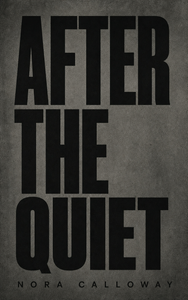
The title is the design — oversized, confident type filling 60–80% of the cover, with imagery (if any) playing a supporting role.
Why it works: At thumbnail size, type survives better than almost anything else. Big, bold lettering reads instantly and signals genre before a reader even processes the image. Design trend coverage from cover studio Damonza and design house Miblart both point to oversized, high-contrast typography as one of the defining looks of 2026 — a direct response to books being discovered on phones first.
Genre fit: Literary fiction, thrillers, contemporary fiction, self-help.
Execution: Pick one strong font, or one font pair — never more than two. Bold weight, high contrast against the background. Shrink your draft to 128 px wide and see if it still reads.
Skip it if: your title runs 11+ words, or your genre expects heavy imagery (epic fantasy, for instance).
2. Minimalist & White-Space-Forward
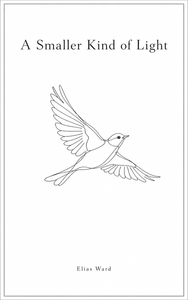
One element — a word, a line drawing, a single object — floating in generous white or near-white space.
Why it works: A white cover pops against Amazon’s busy, often dark results page, and it signals editorial confidence.
Genre fit: Literary fiction, memoir, poetry, business and leadership nonfiction.
Execution: Use true white, not cream, for maximum contrast, and keep your one element razor sharp. If your background is white or very light, add a narrow 3–4 pixel border in medium gray — this is Amazon’s own recommendation, straight from the official KDP cover guidelines, because pale covers can visually disappear against the store’s white background.
3. The Single-Symbol Icon Cover
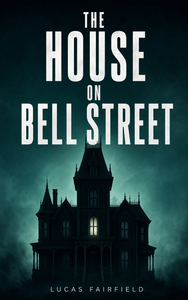
One strong, symbolic image carries the whole message — a bird, a house, a key, a single object standing in for the story.
Why it works: A symbol reads instantly, survives compression at thumbnail size, and invites the reader to fill in the meaning themselves — which is exactly why birds and houses keep showing up on literary and psychological-thriller covers.
Genre fit: Literary fiction, contemporary women’s fiction, psychological thrillers, memoir.
Execution: Use a clean vector icon or one well-composed photograph, paired with a single color and bold type. Avoid the generic “stock symbol” look by choosing an object that’s a little unexpected.
4. Bold Color-Block & High-Contrast
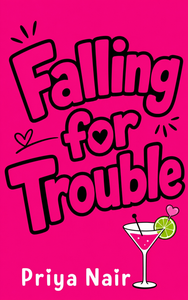
Saturated, flat-color backgrounds — hot pink, electric blue, sunflower yellow — with big type and minimal imagery. Contrast does the work.
Why it works: High-contrast color survives thumbnail compression and stands out in a feed of muted competitors. Romance proved this palette sells; now most genres have followed.
Genre fit: Romance, women’s fiction, YA, thrillers, business books.
Execution: Pick one or two colors, never a rainbow. Make sure your title color contrasts hard — white on dark, or black on bright. A flat background also hides amateur photo-editing instantly, which makes this one of the most beginner-friendly options on this list.
5. Genre-Trope Covers, Done Right
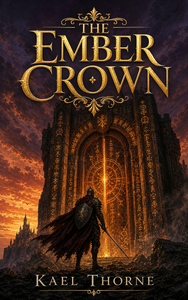
Lean into your genre’s visual conventions — thriller’s shadowed urban frame, romance’s couple-in-motion, fantasy’s illustrated world — but execute with quality, not cliché.
Why it works: Readers scan for genre signals within the first second or two. A cover that clearly looks like its genre converts better than a “creative” cover that reads as unclassifiable.
Genre fit: All commercial genres — this is the rule for romance, thriller, fantasy, sci-fi, and horror.
Execution: Study your category’s current bestseller covers. Note the shared palette, character placement, and font style, then match the convention and add one distinguishing detail.
- Do: use the genre’s expected palette and type.
- Don’t: reach for the exact cliché image Amazon’s already full of — the couple silhouette, the single drop of blood on white.
6. The Big-Five Editorial Look
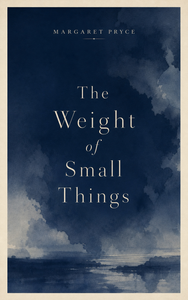
The restrained, premium aesthetic of traditional publishing: clean composition, refined serif type, a small author name near the top, an understated palette.
Why it works: It instantly reads as “traditionally published” — the fastest visual shortcut past the self-published stigma.
Genre fit: Literary fiction, serious nonfiction, memoir, history.
Execution: A serif or elegant sans-serif typeface, small-caps author name, a muted palette (navy, cream, forest green, oxblood), and generous margins. No clip art, no busy textures.
7. Handcrafted & Illustrated
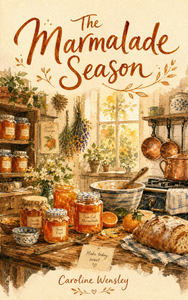
Painted, sketched, collaged, or textured artwork with visible brushwork and a human touch — “art over photography.”
Why it works: In a market saturated with AI-generated imagery, a cover that feels made rather than rendered stands out. Illustration also sidesteps the “that’s not how I imagined the character” problem readers sometimes have with photographic covers.
Genre fit: Fantasy, cozy mysteries, middle-grade, memoir and essays, and hand-painted-style romance.
Execution: Commission an illustrator, or try painting it yourself in Procreate or Photoshop, or collage from licensed textures. Full custom illustration commissions for indie authors typically run a few hundred dollars and up — get two or three quotes rather than relying on one number.
A quick word on AI: AI-generated cover art is everywhere now, and readers can usually spot the generic ones. Treat AI as a tool for ideation or raw assets, not a replacement for a human eye on hierarchy, genre fit, and polish — and always double-check that the licensing on any AI-generated element actually allows commercial use before you publish.
8. Authentic Photography Covers

Real, atmospheric photography — an old photo, a striking landscape, a documentary-style moment. Not generic stock.
Why it works: Photography can carry an emotional authenticity illustration can’t, which is why it works so well for memoirs, history, and grounded contemporary thrillers.
Genre fit: Memoir, biography, history, literary fiction, contemporary thriller, outdoor and adventure nonfiction.
Execution: Use personal or properly licensed photography, and look past the first page of any stock site — readers have seen those top results before. Apply a bold duotone or color grade to unify the image with your typography.
- Don’t: use the first hit on a free stock site.
- Do: crop aggressively to a single, strong focal point.
9. Retro & Vintage-Inspired
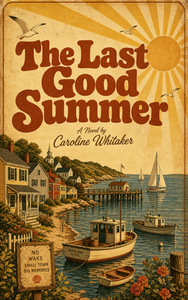
Mid-century illustration, Art Deco geometry, ’70s color palettes, vintage paper textures — design that borrows the confidence of an earlier era.
Why it works: Retro styling adds instant character and a curated feel, and it performs especially well on Pinterest, one of the biggest traffic sources for self-published authors.
Genre fit: Historical fiction, cozy mystery, women’s fiction, pop-science nonfiction, anything nostalgic.
Execution: Pick one era and study its typography and color rules rather than mixing several. Free, era-appropriate fonts from Google Fonts work well here — just keep your title itself modern-legible even as the imagery leans vintage.
10. Pattern & Texture-Forward
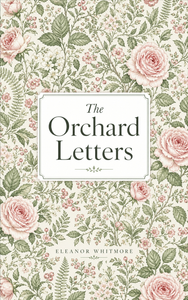
The cover is a pattern — botanical repeats, wallpaper-style florals, geometric shapes, marbled paper — with the title set cleanly over or inside it.
Why it works: Pattern covers are everywhere in women’s fiction and wellness right now because they photograph beautifully for social media, signal genre instantly (florals read as contemporary romance or women’s fiction on sight), and hide the telltale signs of amateur image handling.
Genre fit: Romance, women’s fiction, cozy mystery, wellness and self-care, literary fiction.
Execution: Use a licensed pattern or build one yourself in Canva. Set the title in a high-contrast block or badge so it stays legible over the busy background, and keep pattern density moderate so the thumbnail doesn’t turn to visual noise.
11. Series & Author-Brand Systems
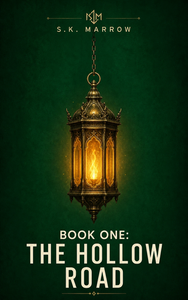
A consistent design system across a series, or across your whole catalog — the same layout grid, font family, and color rule, varying only the key visual per book.
Why it works: A matching series reads as an intentional brand. It boosts cross-buy (“if you liked book one…”) and makes a self-published author look established — readers see the same name on a repeating design and register it as a big deal.
Genre fit: Fantasy series, romance series, cozy mystery series, ongoing nonfiction (“The X Habit,” and so on).
Execution: Lock the system before book two — layout, type, palette, and your author-name treatment — and save it as a reusable template. Each new book then swaps just one variable: color, a symbol, a subtitle. If you’re planning a series, this idea should drive the design of book one.
This is genuinely the cheapest way to look professional. Consistency reads as strategy, even on a zero-dollar budget.
Tools & Resources
- Canva or Adobe Express — free tiers, cover templates, one-click size presets. The easiest starting point for Ideas 1, 2, 4, 10, and 11.
- Procreate, Photoshop, or GIMP — for illustration and photo manipulation (Ideas 7 and 8). GIMP is free and open-source if budget is tight.
- Google Fonts — a free, high-quality type library. Font licensing for commercial cover use is generally broad, but check the specific license on any font before you publish.
- Adobe Stock, Depositphotos, or Creative Market — for licensed imagery and textures. Always confirm commercial-use rights before uploading a cover built with stock elements.
- Book Brush, Designhill, or Canva’s own book-cover templates — purpose-built ebook cover galleries, good for absolute beginners who want a head start.
- Hiring a designer: it’s worth it once you’ve tried DIY and sales are still flat, or your genre demands convention-perfect execution (romance and fantasy readers, in particular, are extremely cover-fluent). Custom freelance covers typically run a few hundred dollars, with pricing varying widely by designer experience and whether you need print formats too — get two or three quotes before you commit to one.
Before You Design Anything: The Rules That Apply to All 11
These specs come straight from Amazon’s official KDP cover guidelines — verify them again yourself before you upload, since platforms do update requirements over time.
Size & format
- Upload at 1,600 × 2,560 pixels (a 1.6:1 height-to-width ratio).
- JPEG is the preferred file format.
- RGB colors only — Kindle does not support CMYK.
- If your background is white or very pale, add a 3–4 pixel medium-gray border so the cover doesn’t visually vanish against Amazon’s white page.
Thumbnail test Your cover has to read at roughly 128 pixels wide — the size most readers will actually see it. Shrink your draft down. If the title blurs or disappears, simplify.
Legibility rules
- The title must be 100% readable even with imagery behind it.
- Stick to a maximum of two or three fonts.
- Size your author name with confidence — new authors consistently make it too small.
No-no’s, straight from KDP’s own checklist No spine, barcode, or back-cover content on an ebook cover. No watermarks or placeholder text. No typos. No pricing or tagline text on the image itself. Your title and author name must match your Amazon detail page exactly.
One genre signal, one focal point If your cover doesn’t look like its genre within about two seconds, redesign it.
Your Move
Strip away all 11 ideas and one thread runs through every single one: professional means readable at thumbnail size, genre-clear at a glance, and built around one clear idea instead of five competing ones.
If you’re not sure where to start: beginners should try Ideas 1, 2, or 4. Genre-fiction authors, lean on Idea 5. If you’re planning a series, start with Idea 11 — it should shape book one, not get bolted on later.
Pick one idea, build a rough version today, and test it against your current cover at thumbnail size. You can always iterate later — but you can’t iterate on a cover nobody looks at.
FAQ
What size should an ebook cover be? 1,600 × 2,560 pixels, a 1.6:1 ratio, saved as a JPEG in RGB. Amazon’s official cover guidelines list this as the standard for Kindle covers.
Can I design a professional ebook cover myself with no experience? Yes. Ideas like the big-type statement cover or color-block cover are specifically forgiving for beginners — they hide amateur photo work and lean on layout and contrast instead, both of which are achievable in Canva.
How much does a professional ebook cover cost? It varies widely by designer and complexity, but most self-published authors budget somewhere in the low hundreds of dollars for a custom freelance cover, more for full illustration or an agency. Get two or three quotes rather than anchoring on one figure.
Should my ebook cover match my print cover? It should share the same core design — typography, palette, key image — but the ebook version is a single front-panel file, while print needs a full wraparound cover with spine and back matter, built to different specs.
How do I make my cover stand out at thumbnail size? Shrink your draft to roughly 128 pixels wide while you’re designing, not just at the end. If the title or focal point disappears at that size, the cover needs bigger type, higher contrast, or a simpler composition.
Can I use AI to design my ebook cover? You can use AI tools for ideation or raw assets, but treat it as a starting point, not a finished product — generic AI output is increasingly easy for readers to spot. Also confirm the licensing on any AI-generated element before you publish commercially.
Which fonts work best on ebook covers? Bold, high-contrast typefaces that stay legible at small sizes. Limit yourself to two or three fonts total, and always test your choice shrunk down to thumbnail size before finalizing it.